Wave Line Print 16:9
 1:1AI-generated · Google Flow
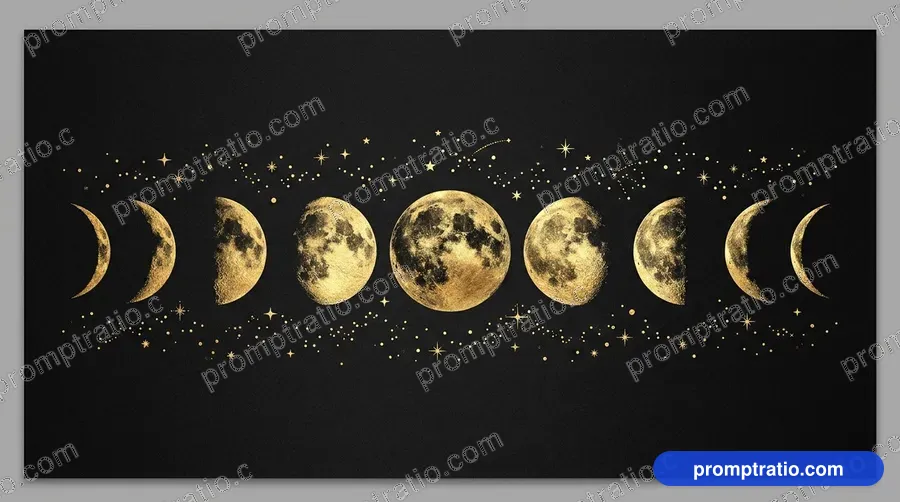
Moon Phase Row
Gold moon phases on black.
Curated by Bhawani Singh · Added · Image made with AI (Google Flow)
Platform
Aspect ratio
Prompt for IG Square (1080 × 1080)
Tested on Google FlowA wide wall art print of the moon phases in a neat row in gold foil on a black background with tiny stars above and below. No text. Compose as square 1:1 for IG Square, with the main subject fully inside the frame and safe margin on every side.
Paste into Google Flow and pick the closest ratio in its settings. Finish exact sizes in the crop tool.
Did this prompt work for you?
Tried in:
Be the first to tell others how it went
Live Crop Preview
How this image crops in each format. If a crop loses the subject, generate that ratio from the prompt above.
Crop this picture exactly, at full size, in the Crop ToolAbout this prompt
We made the picture above with this prompt on Google Flow. It has a print art style, flat light and a mystic, elegant mood, and it sits in the Print & Wall Art collection.
The frame is 16:9 (wide), and our original measures 1376 × 768 pixels. That shape is an exact fit for YouTube thumbnails, X posts and desktop wallpapers; LinkedIn posts and Facebook posts take it with a small crop. It was made with prints in mind.
- Style
- Print art
- Lighting
- Flat light
- Mood
- Mystic, elegant
- Use case
- Prints
Make this prompt your own
- Light
- The light comes from the scene itself; our notes call it flat light. To change it, add a few words at the end, such as “soft light” or “soft even light”.
- Rules
- The last words, “No text”, stop the tool from writing on the picture. That leaves clean space for your own title.
Same theme, another look
In other light: Pichwai Cows Print (rich colours), Sea Shells Grid Print (soft colour) and Sun and Moon Line Art (flat print).
In another style: Varanasi Ghats Print (illustrated print), Gond Peacock Tree (wall art) and Phad Style Scroll Print (folk art print).
How to change this prompt
Worked examples: one part of this prompt as it is, then rewritten. Paste the new words in place of the old ones, or copy the whole prompt with the change already made.
Add a light
Now: A wide wall art print of the moon phases in a neat row in gold foil on a black background with tiny stars above and below
Try: A wide wall art print of the moon phases in a neat row in gold foil on a black background with tiny stars above and below, dusk glow
The prompt names no light of its own, so adding “dusk glow” after the opening words steers the picture away from the flat light it came out with.
Try another style
Now: A wide wall art print of the moon phases in a neat row in gold foil on a black background with tiny stars above and below
Try: A wide wall art print of the moon phases in a neat row in gold foil on a black background with tiny stars above and below, in a travel poster style
This turns the print art look into travel poster, a style other prompts in this collection use; the rest of the words stay.
Change a colour
Now: A wide wall art print of the moon phases in a neat row in gold foil on a black background with tiny stars above and below
Try: A wide wall art print of the moon phases in a neat row in gold foil on a cream white background with tiny stars above and below
Trading “black” for “cream white” gives a new colour scheme without touching the layout.
Add weather or a season
Now: A wide wall art print of the moon phases in a neat row in gold foil on a black background with tiny stars above and below
Try: A wide wall art print of the moon phases in a neat row in gold foil on a black background with tiny stars above and below on a misty winter morning
The prompt says nothing about weather, so “on a misty winter morning” adds a season without changing who or what is in the picture.
Which model gives what
“Moon Phase Row” was made on Google Flow, which returned this 16:9 frame at 1376 × 768 pixels. All 98 prompts in Print & Wall Art were made on Google Flow.
In our gallery ChatGPT pictures come in 1:1 at 1254 × 1254, 3:2 at 1536 × 1024 and 2:3 at 1024 × 1536, and none of them are 16:9. Run this prompt there and expect the nearest of those shapes, then crop it back to 16:9.
How to use this prompt
- 1Pick your platform or ratio at the top. The prompt rewrites itself for that size.
- 2Press Copy Prompt, open Google Flow and paste it. For this picture’s shape, pick 16:9 in its settings before you send.
- 3Make it yours: change the colours, place or product in the prompt’s words before you send it.
- 4Generate two or three times and keep the best. For an exact YouTube size, finish it in the Crop Tool.
Questions
Is this prompt free?
Yes. Copying the prompt is free for everyone. Signed-in visitors can also download the full-size image without a watermark, 10 images a day.
Will I get exactly this image?
Close, not identical. AI tools make a new picture every time, so the style, light and mood will match while faces and small details change. Run it a few times and pick the one you like.
Does it work outside Google Flow?
It was tested on Google Flow. It also works in ChatGPT and most other image tools, though results vary from tool to tool.
Which platforms is this size good for?
It was made in 16:9 (wide), which suits YouTube, X, LinkedIn, Facebook, Desktop Wallpaper. For any other size, choose it with the buttons at the top; the prompt and the crop preview change with it.
Can I use the image for my business?
What you make belongs under the rules of the AI tool you used, so check its terms first. Read our disclaimer before using images for ads or products.
Related Print & Wall Art Prompts
Wave Line Print 16:9 Indigo Wave Print 16:9
 Ocean Wave Woodblock Print 16:9
 Sun Ripples Print 9:16
 Three Hills Print 9:16
 Linocut Wave at Sunset 9:16
 Wave Lines Print 16:9
 Boat Horizon Print 16:9
 Whale Tail Print 16:9
 City Travel Poster 9:16
 Boho Abstract Print 9:16
 Mid-Century Sun Print 9:16