 Clay Chef at a Pizza Oven 1:1
 1:1
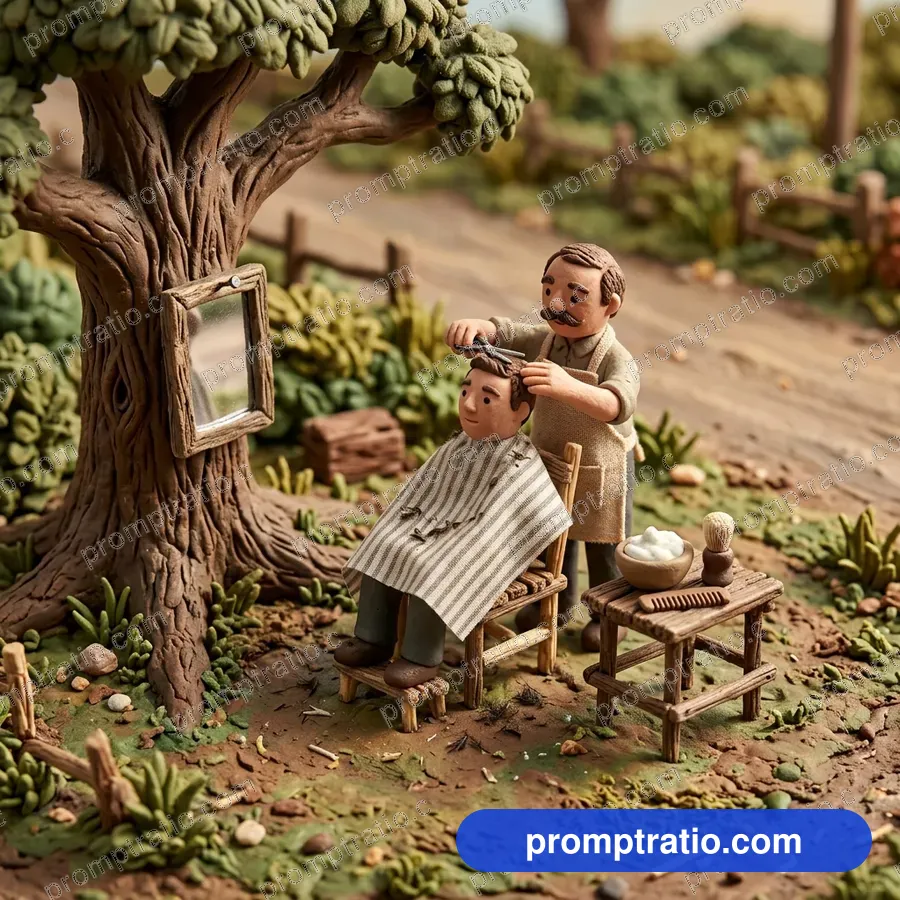
Clay Roadside Barber
A tiny clay barber giving a haircut.
Platform
Aspect ratio
Prompt for IG Square (1080 × 1080)
Tested on Google FlowA claymation style miniature roadside barber shop with a clay barber trimming a man's hair on a wooden chair, a small mirror nailed to a tree, foam and a comb on a tiny table, handmade clay texture. No text. Compose as square 1:1 for IG Square, with the main subject fully inside the frame and safe margin on every side.
Paste into Google Flow and pick the closest ratio in its settings. Finish exact sizes in the crop tool.
Did this prompt work for you?
Tried in:
Be the first to tell others how it went
Live Crop Preview
How this image crops in each format. If a crop loses the subject, generate that ratio from the prompt above.
Crop this picture exactly, at full size, in the Crop ToolMake it with your own photo
Put yourself in this picture. Your photo goes straight to ChatGPT or Gemini; it is never uploaded to PromptRatio.
- Open ChatGPT (chatgpt.com) or Gemini (gemini.google.com). Both work on a free account.
- Click + and attach two clear photos, one of each person: facing the camera, good light, nothing covering the face.
- Copy the prompt below, paste it in the same message and send.
- Not quite you? Reply “Keep my face exactly as in my photo” and ask again.
Use the two people in my attached photos (one photo each) as the couple in this image. Keep each face, skin tone, hair and age exactly the same, so both are clearly recognisable. Ignore any description of their looks below. A claymation style miniature roadside barber shop with a clay barber trimming a man's hair on a wooden chair, a small mirror nailed to a tree, foam and a comb on a tiny table, handmade clay texture. No text. Compose as square 1:1 for IG Square, with the main subject fully inside the frame and safe margin on every side.
Use only your own photo, or one you have the person’s permission for. Do not use photos of children, celebrities or anyone who has not agreed.
About this prompt
This free Google Flow prompt belongs to the Clay & Stop Motion collection. It asks for a clay art style, soft studio light and a cute, funny mood.
The frame is 1:1 (square), and our original measures 1024 × 1024 pixels. That shape is an exact fit for square Instagram posts; Instagram portrait posts take it with a small crop, and Facebook posts need a deeper one. It was made with posts in mind.
- Style
- Clay art
- Lighting
- Soft studio light
- Mood
- Cute, funny
- Use case
- Posts
Made for:Instagram Posts
Make this prompt your own
- Who is in it
- The opening words, “A claymation style miniature roadside barber shop with a clay barber trimming a man's hair on a wooden chair”, decide who is in the picture. Change the age, clothes or place there and keep the rest for the same look.
- Light
- The prompt does not ask for a particular light, and the picture came out with soft studio light. To steer it, add a few words at the end, such as “soft light” or “bright daylight”.
- Rules
- The last words, “No text”, stop the tool from writing on the picture. That leaves clean space for your own title.
Same theme, another look
In other light: Clay Baraat (soft light), Clay Cricket Match (bright daylight) and Clay Birthday Party (bright party light).
In another style: Clay Rainy Street (claymation) and Clay Chai Stall (claymation style).
How to use this prompt
- 1Pick your platform or ratio at the top. The prompt rewrites itself for that size.
- 2Press Copy Prompt, open Google Flow and paste it. For this picture’s shape, pick 1:1 in its settings before you send.
- 3Want yourself in it? Upload a clear photo of both faces with the prompt. The own-photo guide has the exact words to add.
- 4Generate two or three times and keep the best. For an exact IG Square size, finish it in the Crop Tool.
Questions
Is this prompt free?
Yes. Copying the prompt is free for everyone. Signed-in visitors can also download the full-size image without a watermark, 10 images a day.
Will I get exactly this image?
Close, not identical. AI tools make a new picture every time, so the style, light and mood will match while faces and small details change. Run it a few times and pick the one you like.
Does it work outside Google Flow?
It was tested on Google Flow. It also works in ChatGPT and most other image tools, though results vary from tool to tool.
Which platforms is this size good for?
It was made in 1:1 (square), which suits IG Square, Instagram, Facebook. For any other size, choose it with the buttons at the top; the prompt and the crop preview change with it.
Can I use the image for my business?
What you make belongs under the rules of the AI tool you used, so check its terms first. Read our disclaimer before using images for ads or products.
Related Clay & Stop Motion Prompts
Clay Chef at a Pizza Oven 1:1 Clay Desk Setup 1:1
 Clay Robot Workshop 1:1
 Clay Chaiwala and Customers 1:1
 Clay Dinosaur Park 16:9
 Clay Fishermen at Sea 16:9
 Clay Railway Platform 16:9
 Clay Diwali House 1:1
 Clay Kitchen Scene 1:1
 Clay Bakery Shop 1:1
 Clay Post Office 1:1
 Clay Underwater Friends 16:9
 Clay Rocket Launch 9:16